Closet: an outfit in one glance
An AI wardrobe for busy students. It suggests outfits only from clothes they already own, using their calendar and the weather, and explains every pick so they can grab one and go.
The problem
A student's day can run from a 10 AM class to a 2 PM career fair to an evening meetup. Picking one outfit that works for all of it, the weather, and what's actually clean is a small decision that eats a busy morning.
Most style apps answer with shopping or a feed of other people's clothes. The question is simpler: what should I wear today, from what I own?
The idea
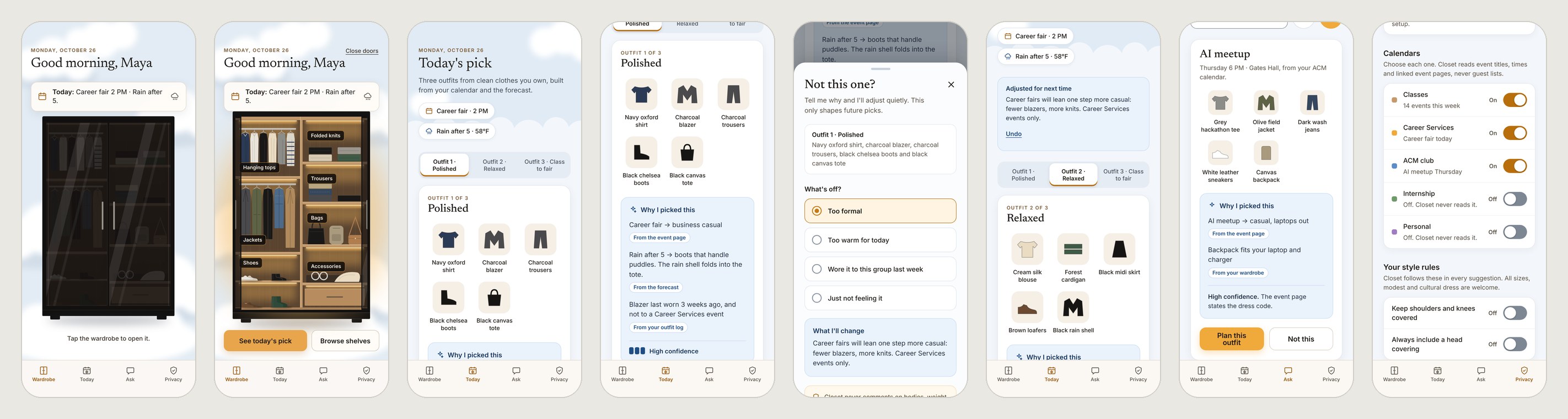
Closet reads the day's calendar and forecast, then picks three outfits from clean items in the wardrobe, with no prompt needed.
Every pick says why and where that reason came from. If it got the dress code wrong, one tap fixes it, and Closet says what it learned with an undo.
How a pick is made
- 1 · ContextReads the dayOnly the calendars the student turns on, plus the forecast. Event pages give the dress code when they state one.
- 2 · WardrobeUses what's cleanItems in the laundry or worn recently sit out. Nothing to buy, ever.
- 3 · PickExplains itselfThree outfits, each with reasons, the source of each reason, and a confidence level.
- 4 · StudentDecidesWear this, swap one piece, or Not this. Corrections change future picks, and every change can be undone.
Inside the prototype
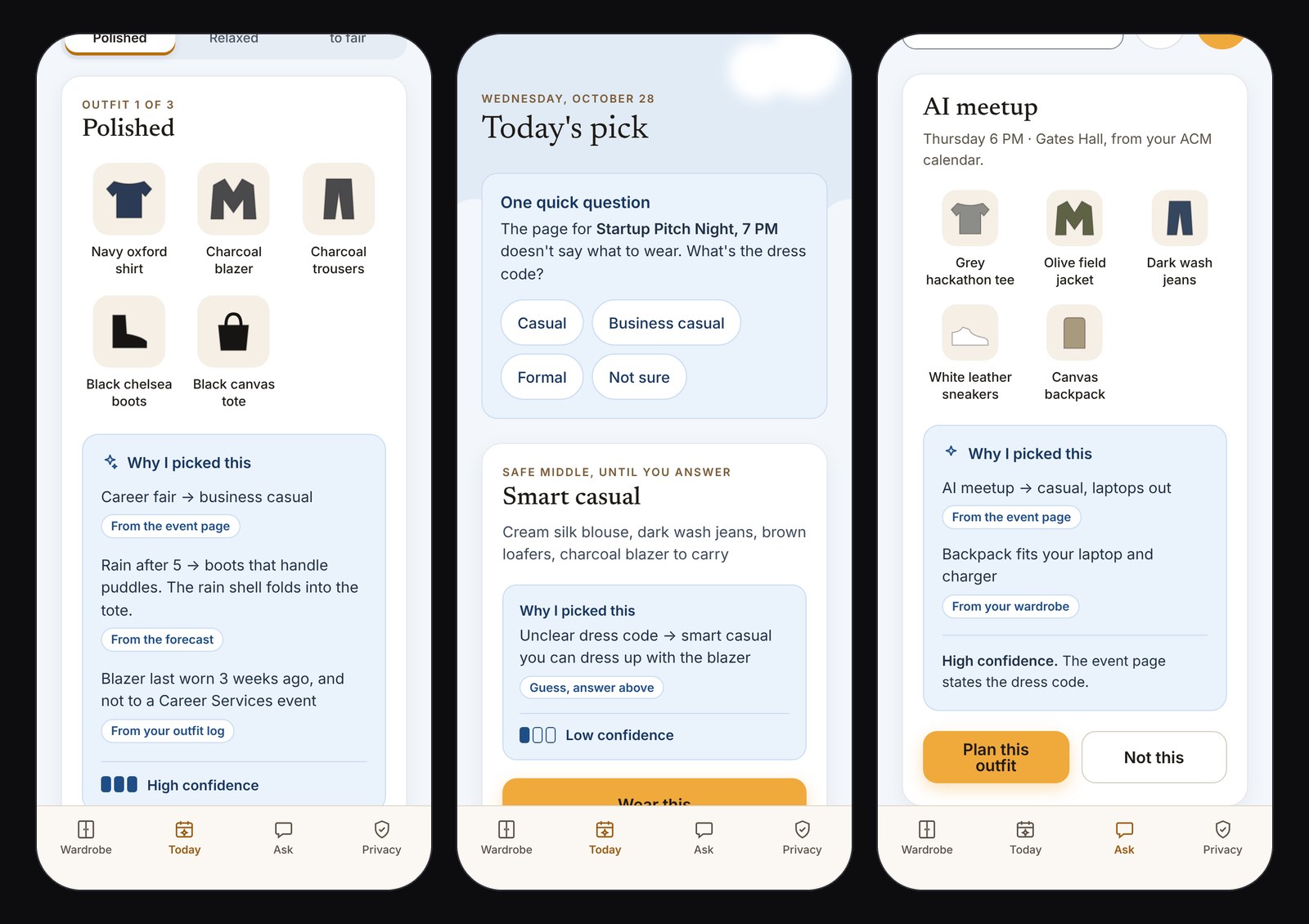
Every reason names its source
Each pick lists why, and every reason carries a chip: from the event page, the forecast, your outfit log or your feedback.
Confidence is shown, not hidden. High when the event page states a dress code, low when Closet is guessing, and "Confirmed by you" once the student fixes it.
When it doesn't know, it asks one short question instead of guessing, and suggests a safe middle until it hears back.
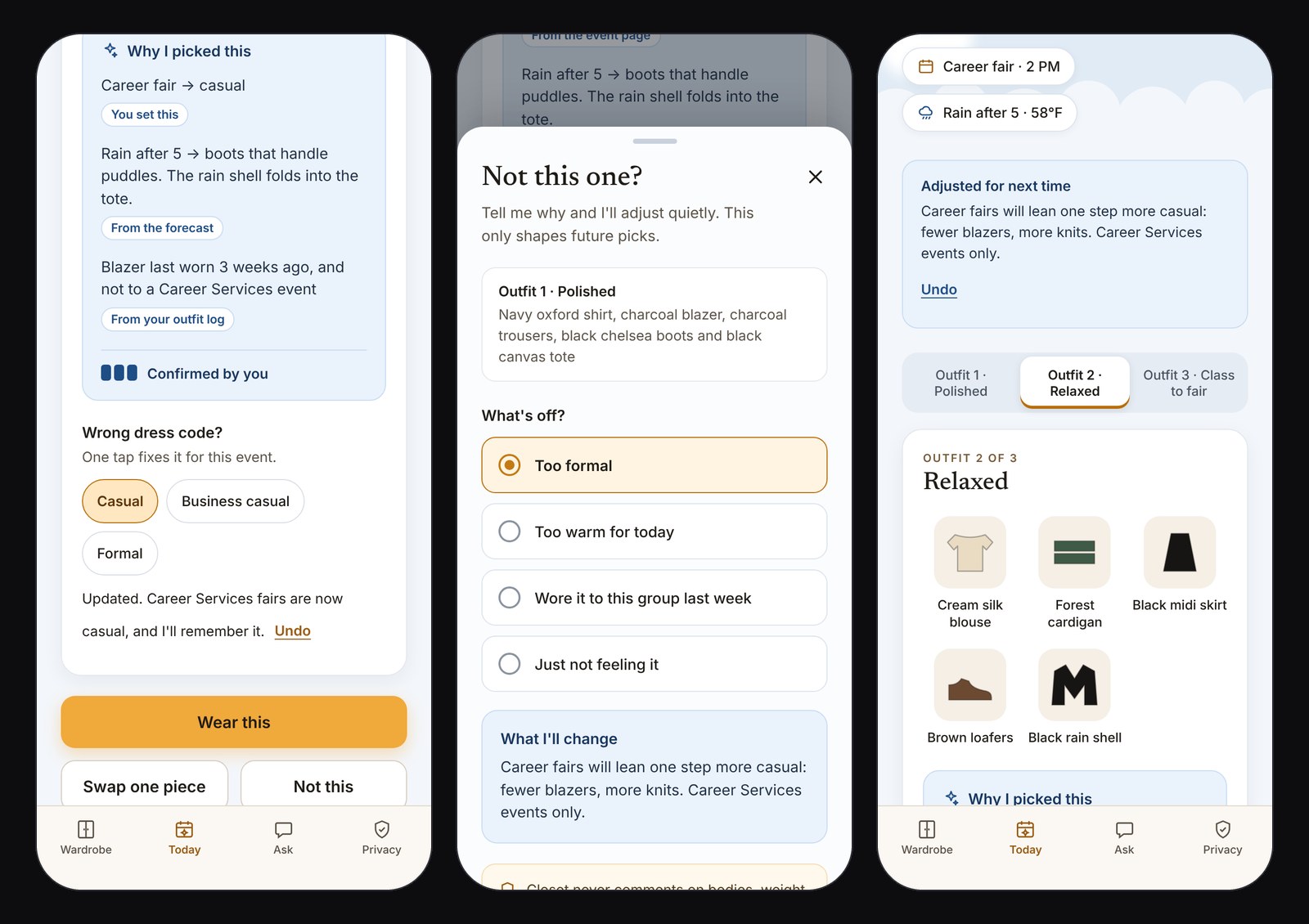
One tap to fix, with an undo
Wrong dress code? Three chips fix it for this event, and Closet says it will remember.
Not this opens over the outfit being rejected, so the reason sticks to the right pick. Closet shows exactly what it will change before moving on.
The reasons are about clothes and plans only. Closet never comments on bodies, weight or fit.
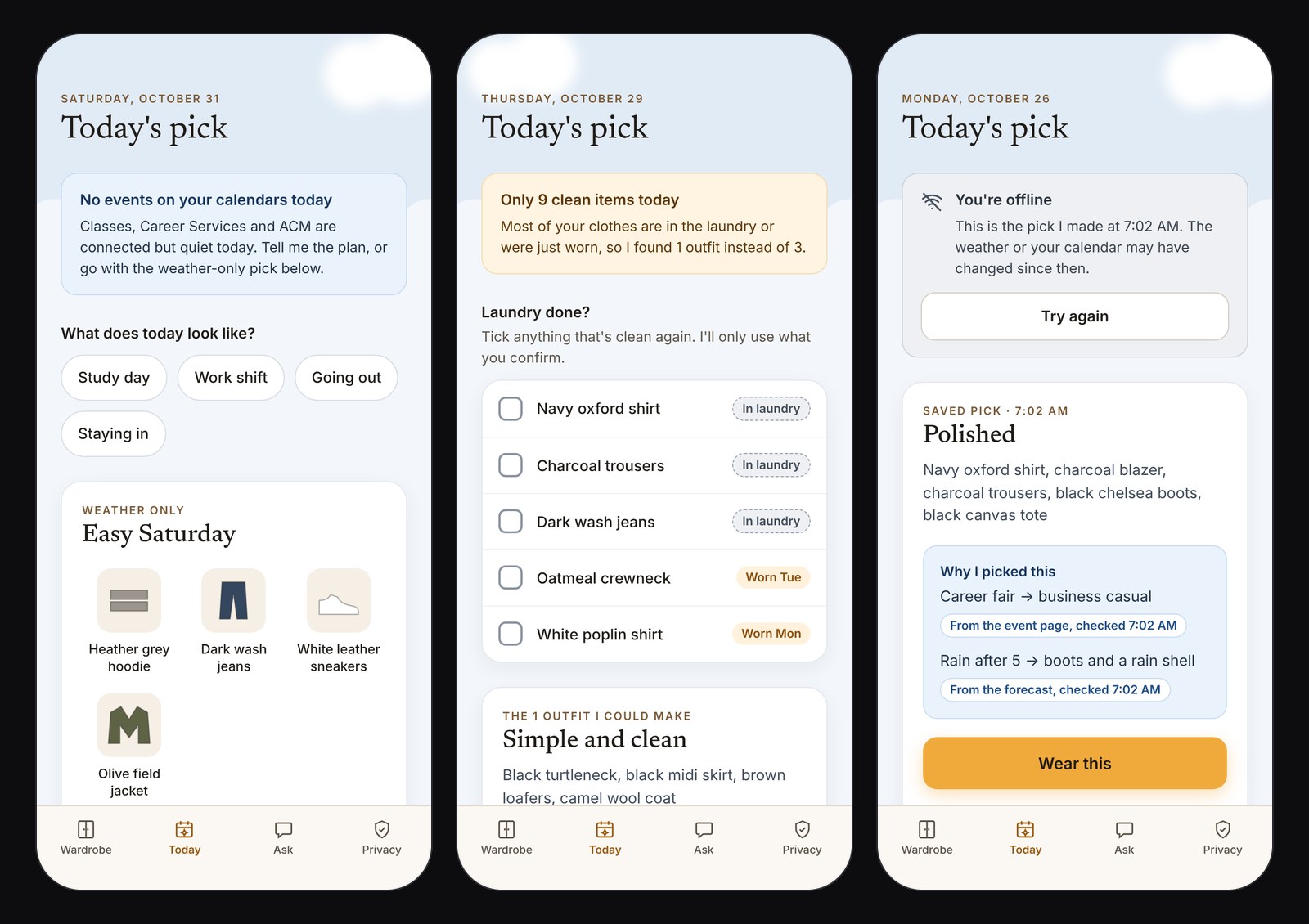
Honest when the data runs out
No events, a laundry-day wardrobe, offline: each state says what's missing in plain words and still offers a next step.
Confidence drops to match. A weather-only pick is labeled low confidence, and offline reasons show when they were last checked.
It never blames the student for missing data. It asks, or works with what it has.
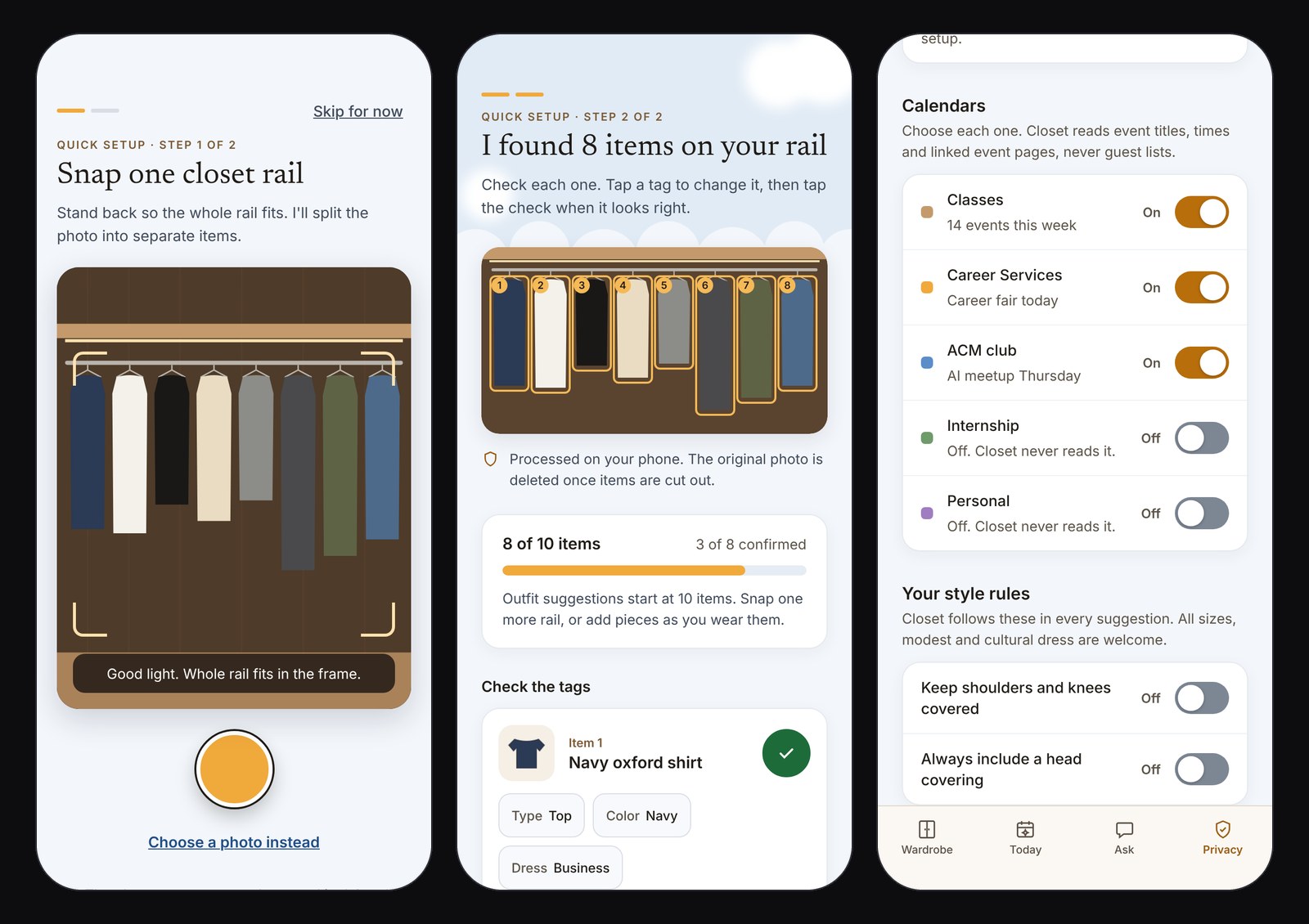
Value in one photo, on the student's terms
One photo of a closet rail becomes separate items. The student checks each tag, and anything the AI is unsure of is flagged in words.
Calendars are opt-in one by one. Work and personal can stay off, and photos are processed on the phone.
Style rules cover modest and cultural dress, and learned preferences are listed so they can be removed. Delete everything is one button.
Key decisions
- Delight first, then speed.The wardrobe doors slide open on the first few visits. After that they open on their own and land on today's pick, and Reduce Motion swaps the slide for a crossfade.
- Only what you own.No shopping and no feed. The trade-off: suggestions are only as good as the wardrobe Closet knows about, so setup has to be fast.
- Explain, then let people fix it.A pick without reasons asks for blind trust. Sources, confidence and one-tap corrections make it checkable.
- Say state in words, not just color.Clean, in laundry and worn recently each have a label, and every item is announced to screen readers with its state, like "Navy oxford shirt, clean."
What exists and what doesn't. A clickable prototype with 12 screens and 4 edge cases, a Figma file with editable layers, components and a linked prototype, and a design spec with measured contrast. Wardrobe recognition, calendar reading and the outfit logic are designed, not built, and the wardrobe is a fictional student's. Next: run the morning flow with 5 students and measure time from opening the app to "Wear this," and how often they trust or correct the reasons.